
What Is A DCP? A Filmmaker's Guide

A digital cinema package (known as a DCP) is the industry standard format for delivering films to movie theaters worldwide. A DCP is a collection of files made up of Film Elements - Picture, Audio, and Text, and metadata files - Asset Map, Composition Playlist, Packing List, and Volume Index. Both film elements and metadata are critical for projection at any digital cinema. Each media component is encoded separately and combined at playback. This is the key feature that reduces duplicate data and allows the digital cinema package to be incredibly flexible for theaters.
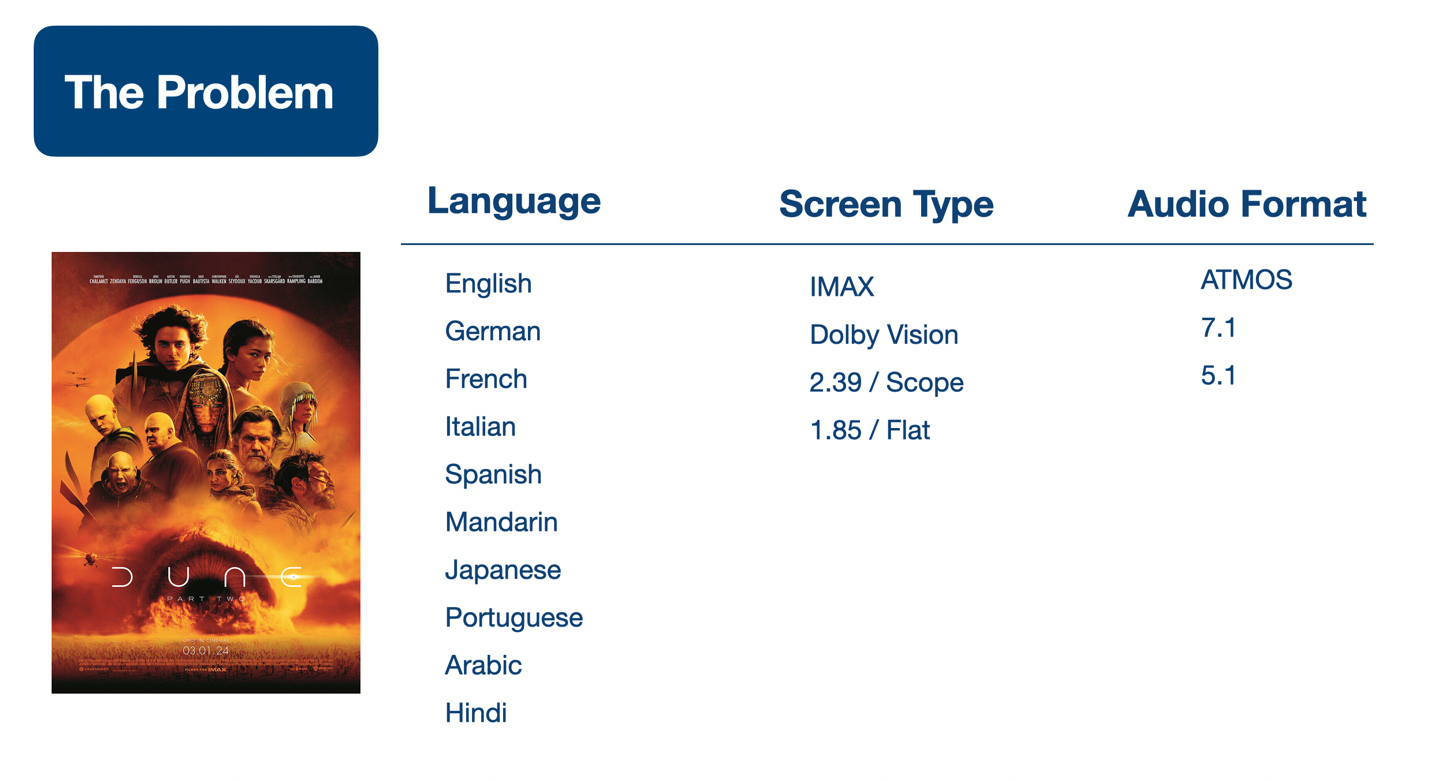 Dune: Part 2 requires 120 separate versions
Already finished your film and just need the DCP? Our Instant DCP service is $10 per minute of runtime for 2K or 4K, $99 minimum, delivered in under 24 hours. Order one here, or read on for what a DCP actually is.
The Version Problem For Modern Cinema
Let’s look at an example for the wide release of a major Hollywood movie. In this simplified example, there are options for 10 languages, 4 screen types, and 3 audio formats that each offer slightly different viewing experiences. While the “hero” version for the domestic US market might be English language, IMAX screen, and ATMOS sound, not all theaters are IMAX or are able to play the film in ATMOS sound. If we were to make a version for each of the combinations shown, we would need to create 120 separate versions of the film! Making these versions would require more time and money to create, quality control check, and deliver. Especially encoding the same picture track multiple times and packing the elements into the material exchange format (mxf). The extra space required to store these versions would likely be several hundreds of gigabytes each. Modern packaged media formats like DCP are designed to address the problem of creating all of these different versions in a cost-effective manner.
Digital Cinema Packages Provide Flexibility
Encoding each film component separately allows a projectionist to mix and match various tracks to create the desired experience for the audience. This gives us the ability to re-use a common picture track, and simply swap out the audio if we need to change the language or change surround sound formats. If we don’t want to change the original language, but want to add subtitles, we can add or change the timed text tracks without re-encoding the entire picture track. Re-using a common picture file across versions provides ultimate flexibility while reducing the processing time and storage requirement to produce multiple versions.
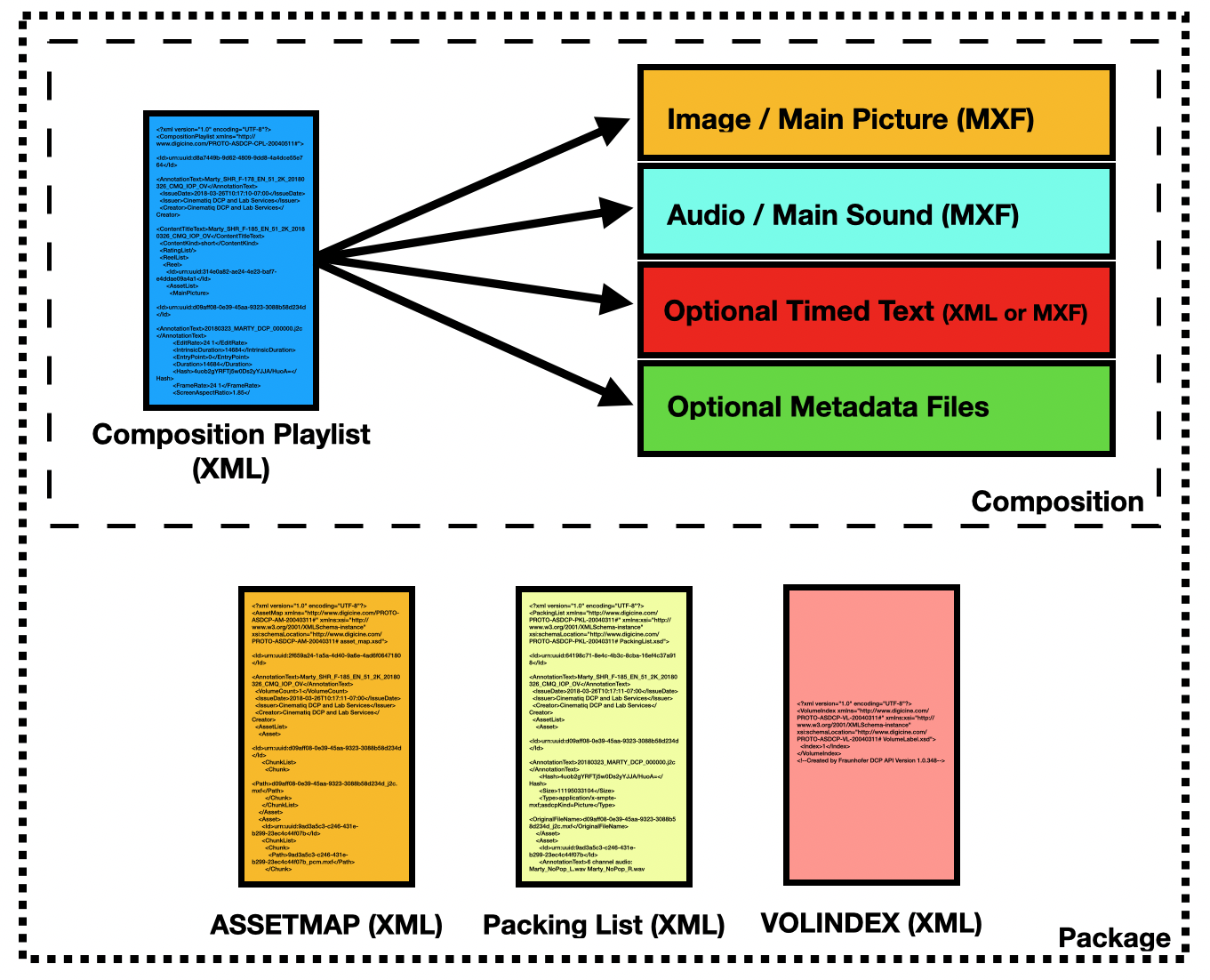
Anatomy Of A DCP
A DCP is composed of one or more compositions, each optimized for big screen projection quality. The more complex the DCP (i.e. the major Hollywood example above), the more compositions it is likely to include in order to provide extra version flexibility, which can be important for film festival screenings. Each composition is made up of encoded media essence tracks - These are the digital files used to store the elements mentioned above - Picture, Audio, and Timed Text. These elements are stored in the composition as mxf files that are tied together by the composition playlist (CPL). The CPL is a text-based document (XML File) that acts like the set of instructions for each composition.
For example, CPL #1 instructs the cinema server to play:
● The 2K Picture Track
● The 5.1 Audio Track
● English Subtitles
CPL #2 instructs the cinema server to play using the specified digital projector settings:
● 2K Picture Track
● 7.1 Audio Track
● No Subtitles
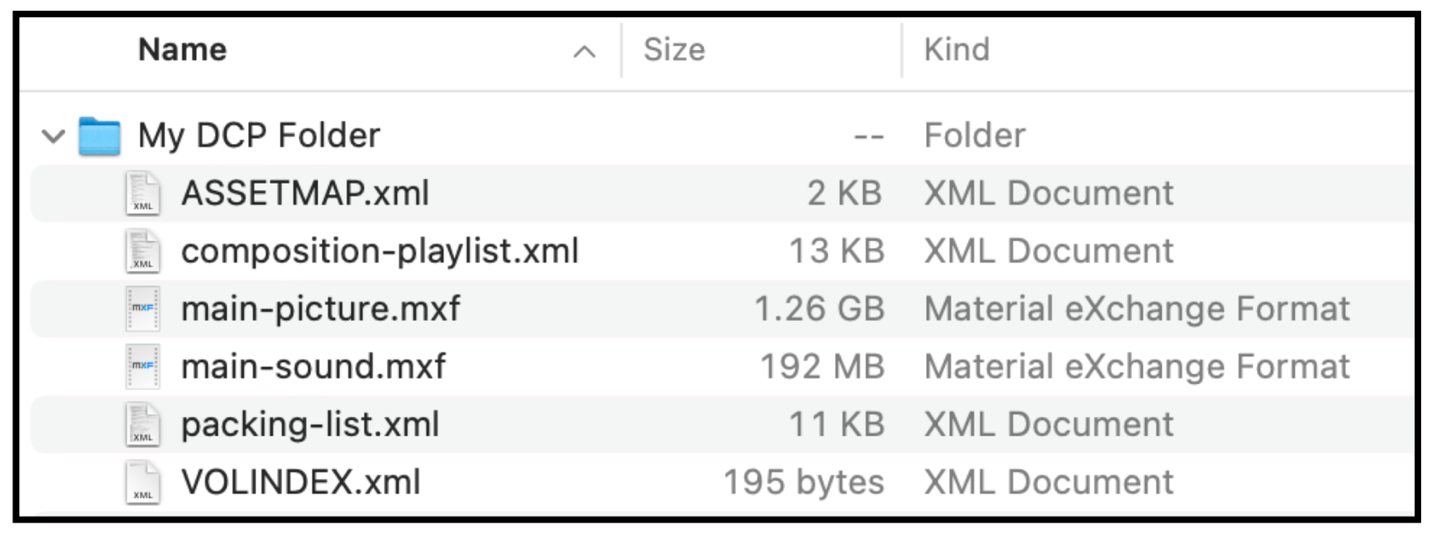 Here we have a very simple package with one main picture track and one main sound track bundled into a DCP with simple and easy to read file names. While this is certainly a valid package, very rarely will you see one that looks like this in the wild.
The compositions are bundled together into a package with additional metadata text files: The ASSETMAP, the packing list (PKL), and the VOLINDEX. These items are important components of your DCP, but you’ll only need a deeper understanding of these concepts if you are making your own DCPs. We’ll cover each of these elements briefly below, but if you want to dig deeper into the weeds, start here.
Packing List (PKL) - The job of the packing list is to assign each media essence file within the DCP a universally unique ID number (UUID). This list also serves as an inventory of all of the files required for the package to be considered complete.
ASSETMAP - Maps the UUID numbers to actual files via their relative or absolute file paths.
VOLINDEX - this file is a vestige of a time when hard drives were too small to contain a large DCP on a single disk. This file specifies the volume number and allows a DCP to span across multiple physical disks. While the reason for the VOLINDEX has been outmoded given that today’s disk drives are quite large and can easily contain even the largest DCP, the file itself is required for it to be considered valid.
It is very important to note that while all of these XML files can be opened in a text editor, any changes made will render the DCP invalid and the theater will be unable to ingest it.
 Apple Pro Res Quicktime is a preferred source file format for DCP
What Is Needed To Make a DCP
When you finish your film, you’ll likely leave your finishing session(s) with the picture as a high-quality, high-resolution deliverable. It will be a QuickTime movie that uses a mezzanine codec such as ProRes, or an uncompressed image sequence in TIF or DPX format. The audio tracks will be either embedded in the QuickTime (most common with stereo audio), or delivered by your audio engineer as a set of .aif or .wav files (most common for surround sound mixes). These surround mixes are generally delivered as a separate file for each channel . The DCP creation process will take these files as inputs and transform them into a standardized digital cinema package that is compatible with the digital projection equipment found in the theater. You will also need to provide the color space and the gamma level used during the color grading process. If you have a colorist, they will be able to provide this information. If you are grading & finishing the picture yourself, it is preferable to use the Rec.709 color space assuming a gamma level of 2.4 (learn more about gamma levels with this article). Your audio should be mixed using “cinema levels”. All deliverables must be thoroughly checked (QC’d) for mistakes, as this will be the version of the film that you will present to the world! For additional information and specifications, please see this article on picture aspect ratios and this article on preparing audio for digital cinema.
What Does It Cost to Make a DCP?
TLDR: Outsourcing a DCP to a professional shop generally runs $10-$15 per minute of runtime, with add-ons for 4K, captions and subtitles, delivery drives, encryption, and extra compositions. At Cinematiq you have two ways to buy:
- Instant DCP - $10/min for 2K or 4K, $99 minimum, delivered in under 24 hours. Automated and self-serve, for standard projects: stereo or 5.1 audio, digital download, single version. Rush is $99 and typically lands within 6 hours.
- Custom DCP - mastered by our engineers over 3–5 business days, for anything complex: 7.1 or Atmos, caption and subtitle track creation, multiple versions, KDM encryption, USB or CRU drive delivery.
Want a number for your specific project? Use our price calculator, or start an Instant DCP order.
If you’re on the fence about creating your own digital cinema package to save some $money, there are some open source software options (dcp-o-matic), or plugins for the post-production tools like Premiere and Resolve that are already in your arsenal. Before going the DIY route, consider that creating a DCP is a technical process that includes a minimum of 10+ required actions to meet minimum standards for playback. The more complex your DCP (i.e. multiple compositions), the more technical steps are required. Testing DCPs can also be problematic without special playback or validation software, so you may not be able to reliably test the output.
Although there are certainly users who report success with these DIY tools, there are plenty of troubleshooting horror stories out there as well. Some film festivals advise filmmakers that any DCP made with the Wraptor plugin for Adobe Premiere Pro will be rejected, as there have been consistent problems with Wraptor DCPs in the past. As of this writing, the Resolve plugin may not be up to date on the latest RDD-52 standards requirements for DCP. RDD-52 standards guarantee successful playback in over 90% of global cinemas.
Check out the lack of consensus on these DIY tools from the r/editors subreddit
If you have a strong technical understanding of digital video and you’ve got some hours to burn, the DIY digital cinema package might save some valuable cash on your tight budget. If you’re short on time and don’t want to risk any surprises that could derail your screening, consider having a professional post house make your DCP.
Short Film DCP Cost
Most DCPs are priced on the runtime of the film, but many professional shops have a minimum charge for shorts under a certain length.
At Cinematiq, a short goes through Instant DCP at $10 per minute with a $99 minimum, so a typical festival short is $99 and comes back as a download link in under 24 hours. That package is yours to send to any festival or screening partner.
If your short needs something the automated pipeline does not cover, such as 7.1 or Atmos audio, caption or subtitle tracks, multiple versions, encryption, or a physical drive, our Custom service handles films up to 20 minutes at a flat $300 for 2K ($400 for 4K) over 3–5 business days.
You can see our full pricing menu here.
Instant DCP
Need a DCP made?
$10/min · $99 minimum · delivered in under 24 hours
2K or 4K, stereo or 5.1. Order online, upload your master, get a download link back the same day.
Feature Film DCP Cost
Some post houses have a flat rate for feature DCPs, but the vast majority charge per minute of runtime, generally $10-$15 per minute for 2K. We’ve seen a big increase in requests for 4K DCPs lately, which run between $15-$20 per minute.
At Cinematiq, a feature through Instant DCP is $10 per minute at either resolution, because the encode is automated. Through our Custom service it is $15 per minute for 2K and $20 per minute for 4K, which buys engineer time, complex audio, timed text, and physical delivery. Keep in mind that many theaters still screen on 2K projectors, so 4K may not be your best option. Check with your festival or theater to confirm what is accepted.
How Much Time is Needed to Create a DCP?
As a general rule of thumb, the longer the film, the more time needed to create the DCP. Most DCPs can be completed from start to finish within 1-2 working days, depending on complexity. The most time-consuming part of the process is encoding the picture element of the DCP. This involves creating JPEG 2000 images from a lossless or low compression source for every single frame of the film. Although faster processors have improved the speed of this process, it could still take multiple hours depending on computational capacity.
At Cinematiq, an Instant DCP is typically delivered in under 24 hours from the moment your upload finishes, with a $99 rush option that usually lands within 6 hours. Custom DCPs are mastered by our engineers over 3–5 business days, with 2-day, next-day, and same-day rush options.
Physical DCP Delivery Methods
As internet speeds have increased globally, there has been an uptick in the electronic delivery of DCPs. However, there is still a high percentage of theaters that require physical DCPs - digital cinema packages delivered on specially formatted hard drives. DCPs delivered on drives is still the industry standard practice. Many theaters do not have the bandwidth required to download multiple 100+ Gigabyte DCPs in a short window of time. Also, some theaters may not be set up to download directly to library management systems.
Delivering a physical DCP drive has strict technical requirements. The drive must be formatted using the ext2 linux based file system with an inode size of 128.
In the past, this formatting process was cumbersome, and had to be completed using command line tools, making it fairly inaccessible for the average filmmaker. This is why we developed DCP Transfer, a simple user-friendly tool that helps filmmakers properly format digital cinema delivery drives.
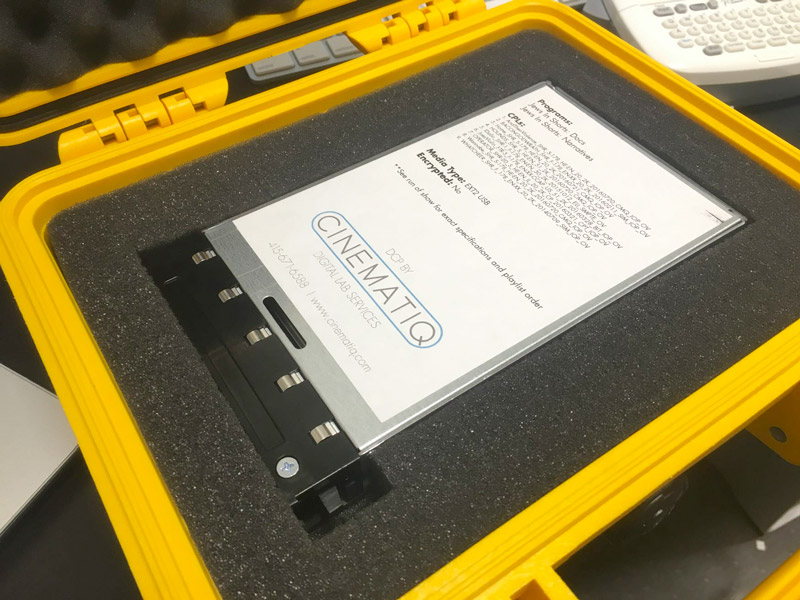
DCP CRU Drives
A CRU drive is an older industry delivery standard hard drive housing for DCP. CRU is a company that makes a special housing for SATA type hard drives that act like internal drives when inserted into a server. Originally, these drives had faster transfer speeds than USB 2.0 technology. CRUs are still requested from certain festivals / venues but are less common today since modern USB drives now have transfer speeds that often match or exceed the CRU drive.
DCP USB Drives
Portable USB 3 drives are the most ubiquitous hard drives available today, and are now an extremely common delivery vehicle for DCP. Since any drive can be formatted properly for digital cinema delivery, USBs have become more popular for DCP delivery because of their affordability and compact size. CRU drives are generally shipped in bulky protective cases, whereas USB drives can be sent in smaller padded envelopes.
Why Hire Us? Quality Control.
This may be the only version of your film the audience gets to see. Make sure that your DCP is made correctly, and with careful attention to detail to achieve the highest quality output. At Cinematiq, we've made 1000s of DCPs for independent filmmakers and festivals across the globe, and quality control is a primary focus of our process. We personally check each DCP for common playback issues in addition to cutting edge software validation tools. Every Instant DCP runs through the same validation before it goes out.
Instant DCP
Ready to make your DCP?
$10/min · $99 minimum · delivered in under 24 hours
2K or 4K, stereo or 5.1. Order online, upload your master, get a download link back the same day.
Working on something more complex? Explore the Digital Cinema Package services page or schedule a time to meet with one of our DCP experts.